The Interface
What all the on-screen info means.
Scoreboard (sidebar)
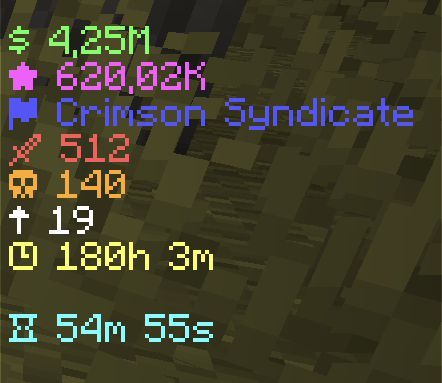
The sidebar on the right of your screen updates every second and shows:
- Money (
$) and Shards (★) - Your team tag (if you're in a team)
- Kills 🗡, Deaths ☠, Level ↑, Playtime ⌚
- The keyall countdown ⌛ — time until the next free keyall
XP bar
A green bar across the top of your screen shows your level and how much XP you have toward the next one. It fills as you play. Turn it off in Settings if you'd rather keep the screen clear.
Nameplate
A floating two-line plate above each player:
- Line 1: their title, rank badge, and name (plus a gray AFK tag while they're away)
- Line 2: their Money and team tag
It hides while sneaking, invisible, or vanished, so a potion of Invisibility really hides you, plate included.
Tab list
Names in the tab list are prefixed with each player's badge/title and sorted
by rank (Owner at the top, no-rank at the bottom). + players can hide their
name here with the Hidden tab name setting.
AFK
After 5 minutes without doing anything (no moving, looking around, chatting or clicking), you're AFK: a gray AFK tag shows after your name in the tab list and on your nameplate. It goes away the moment you move again.
While you're AFK:
| What | AFK |
|---|---|
Playtime (scoreboard, /stats, /lb, weekly boards, rivalries) | Doesn't count |
| XP for being online | Paused |
| Keyall keys and passive Shards | You still get them |
| Random manhunt | You're never picked |
MOTD
The server list message shows a centered two-line MOTD. The second line alternates between the keyall countdown and the daily reward countdown, a glance tells you if it's worth logging in right now.